← Go Back
An Introduction to The JAMstack
Let me introduce you to the JAMstack: a powerful new approach for deploying fast, highly scalable sites and applications.
January 11, 2021 | 6 min read

Introduction
"JAMstack" is a modern architecture designed to make the web faster, safer, and easier to scale.
In recent years, we have seen a storm of advancements on the web platform. JavaScript has matured. Browsers are far more powerful. It certainly feels like the start of a new chapter for the web. You've likely felt this as you've witnessed the explosion of new frontend frameworks and API-based services.
With most internet traffic coming from mobile devices (55.73% market share), users have become increasingly impatient — we want a website to load as fast as possible. (Google also seems to be losing patience, and now factors site speed into its famous ranking algorithms.)
What you'll learn
In this article, we'll dive into the new, modern approaches to building blazing fast and secure websites.
We'll also build and deploy a simple JAMstack app using Eleventy, a static site generator and deploy it to Netlify.
Prerequisites
You should be familiar with:
- The basics of HTML
- The basics of JavaScript
- The concept of server-side programming
- Authoring content in Markdown syntax
- Command line basics
For the practical part of this article, you'll need to have Node and NPM installed on your computer. Use node -v on the command line to find your local Node version.
What is the JAMstack?
Mathias Biilmann, CEO and Co-founder of Netlify coined the term JAMstack and describes it as;
"A modern web development architecture based on client-side JavaScript, reusable APIs, and prebuilt Markup" - Mathias Biilmann
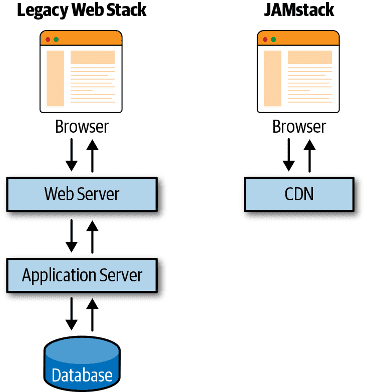
In other words, it is a way of deploying and serving websites that can be served directly from a CDN and don't rely on requests hitting an active application server.
The JAM in JAMstack stands for JavaScript, APIs & Markup.
Let's take a glance at each, individually.
JavaScript
JavaScript handles interactivity and dynamic functionalities. There's no limitation on which framework or library you must use.


and more...
APIs
Decoupling the frontend from the backend allows for more modular development where we can take advantage of the huge ecosystem of third party APIs to provide page website functionality.
Server-side operations are abstracted into reusable APIs and accessed over HTTP with JavaScript. These are often third-party services or your custom serverless functions.
Markup
Websites are pre-built and served as static HTML pages from a CDN. These are often prebuilt from source files, such as Markdown, employing a static site generator for content sites, or a build tool for web apps.
Definitions
CDN (Content Delivery Network)
A distributed network optimized for serving assets to users. By being geographically distributed, a CDN can provide redundancy and also improve delivery performance as a result of servicing requests from the infrastructure closest to the user making the request.
Pre-rendering
To generate the markup which represents a view in advance of when it is required. This happens during a build instead of on-demand so that web servers do not need to perform this activity for every request received.
Why JAMstack?
A JAMstack architecture can bring all kinds of benefits to the sites and project workflows.
Let's check out some benefits JAMstack provides that make it an attractive option.
More secure
Static sites have few avenues for attack since it's just HTML files and external API consumption. No need to worry about server or database vulnerabilities.
JAMstack sites embody these principles to enhance security:
- A minimal surface area with largely read-only hosting infrastructure.
- Decoupled services exposed to the build environment and not the public.
- An ecosystem of independently operated and secured external services consumed via APIs.
Scalability
If your product suddenly goes viral and has many active users, the CDN seamlessly compensates.
A good CDN will have edge nodes distributed globally so that your site is always served to a visitor from the closest server. This greatly improves site performance when considering the geographical location of your site's audience.
Cheap
Hosting of static files is cheap or even free.
Although financial costs are often most blatant, the JAMstack significantly reduces the cost of innovation and improves team efficiency.
Faster Performance
Performance is critical to user experience (UX), user retention, and conversion. Simply put, time is money. Therefore, the faster sites are served, the more value they can unlock.
Pre-built markup and assets are delivered to the client (browser) as quickly as possible because they are easy to serve, and are already as close to the user as is possible thanks to the use of CDN.
The figure below compares both legacy web stack and JAMstack request life cycles.
Better developer experience
Learning and using JAMstack is fun. Web developers can focus on the problem they're attempting to unravel without being tied to a monolithic architecture. That usually means quicker and more focused development.
Best Practices
The following tips will help you realize the real power behind the JAMstack.
CDN Technology
Since all markup and assets are pre-built, they can be served via CDN. This provides better performance and easier scalability.
Atomic deploys
Each deployment is a full snapshot of the site. This helps guarantee a consistent version of the website globally.
Cache invalidation
Once a build is uploaded, the CDN invalidates its cache. This means that your new build is live in an instant.
Git centered workflows
Everything in version control.
Your codebase lives in a Version Control System, such as Git. The main benefits are: change history for every file, collaborators, and traceability.
Atomic builds
Your server is notified when a new build is required, typically via webhooks. Server builds the project, updates the CDNs and the site goes live.
Workflow
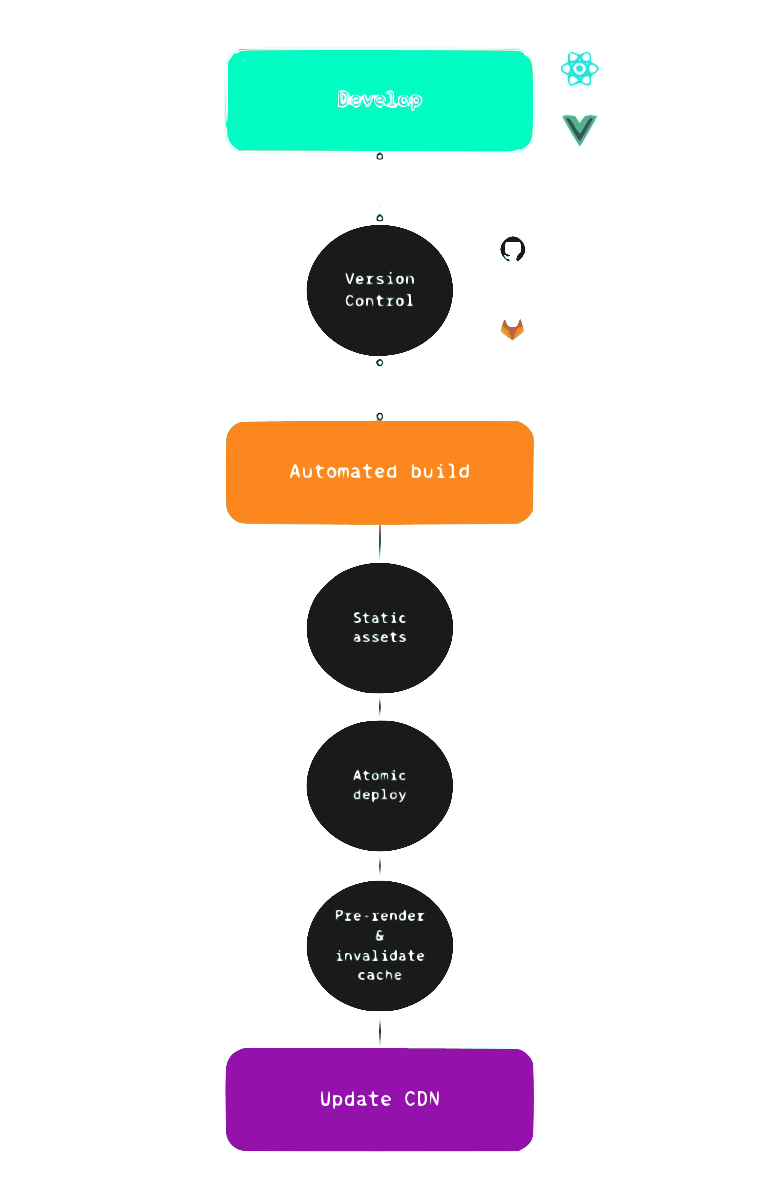
Here is how an ideal JAMstack workflow would look like
- The source for the website is a hosted repository that stores content and code together as editable files.
- Whenever a change is formed, a build process is triggered that pre‐renders the website, creating final HTML from templates, content, and data.
- The prepared, rendered assets are published globally on a CDN, putting them as close to end users as physically possible.
The figure below describes the Jamstack workflow;
Let's start our JAM Session
We'll dive right in and set up Eleventy, a static site generator.
To begin with, let's create a directory for our project and change into it.
$ mkdir eleventy-blog
$ cd eleventy-blog
We'll go ahead and install Eleventy as a global dependency using NPM.
$ npm i -g @11ty/eleventyIf you run into any errors when installing the package globally. The solution is running the command with admin privileges i.e
sudo ....
Then, create a new file README.md with some content.
$ echo '# First JAMstack site.' > README.md
$ eleventy
Running eleventy will compile any files matching valid input template file extensions (.md is one of them) in the current directory into the output folder (defaults to _site).
$ eleventy --serveNext, run eleventy --serve to start up a web server. Then open the Local Access URL http://localhost:8080/README/ in your web browser of choice to see your Eleventy output.
Deploying
Let's use Netlify Drop to deploy this site.
Visit https://app.netlify.com/drop, and drag & drop the _site folder generated by Eleventy into the browser window.
Netlify will publish your static assets and give you a link https://[your-site].netlify.app to view the site live.
Conclusion
In this article, you've learned about the Jamstack architecture and should now have an understanding of how it works and the advantages it offers.
You've also built and deployed a very simple static site using Eleventy and Netlify.
I recommend checking out the resources below to continue exploring the Jamstack.
Useful Resources
- Choosing a static site generator
- Modern Web Development on the JAMstack (O'Reilly, 2019) Jamstack book
- jamstack.org: a comprehensive guide for building JAMstack sites and home to the global Jamstack community.
- jamstack.wtf: a simple guide to help you understand why JAMstack exists and how to get started.
- Jamstack Explorers Learning Platform created by Netlify Team
- YouTube Video: Rise of the JAMstack talk by Mathias Biillman
- Podcast: JAMstack Radio